


The core problem is fragmented RFQ workflows: recognition, assignment, history verification, research, availability checks, and quoting, all managed in silos that drain productivity.
If your team sells aircraft parts, manages component repair, supports teardown activities, or runs a busy aviation aftermarket operation, RFQs do not arrive in a neat, orderly fashion. They come from marketplaces, direct emails, website forms, spreadsheets, repeat customers, unfamiliar companies, urgent requests, and long-running customer relationships. That is a lot of opportunity and a lot of sorting!
Effort is not the issue; your team already works hard. The problem is that RFQ workflows often force salespeople to act as routers, researchers, inbox monitors, quote builders, and process checkers simultaneously.
That may hold together at low volume, but as volume grows, the weak spots become easier to see: a quote that sat too long, a request that was assigned late, a no-quote that never became useful data, a manager asking for status because the workflow does not show it clearly.
RFQ management workflows determine how incoming requests move: captured once, routed with context, visible to the right person, and ready for action, instead of depending on whoever notices them first.
The Hidden Cost of “Good Enough” RFQ Workflows
Many aviation businesses seem organized: there is an inbox, folders, a quote module, saved searches, assignment habits, spreadsheets, or a third-party tool collecting requests. Each part may make sense on its own, but issues arise in between.
Your team still has to answer practical questions before anyone can quote with confidence:
- Who owns this RFQ?
- Is this customer already in the system?
- Do we have inventory or an alternate part that fits?
- Has someone already quoted this request?
- Should this be quoted, no-quoted, blocked, or routed somewhere else?
- Is there export compliance due diligence to consider?
- Where is the original email?
- Can a manager see what happened without asking five people?
When answers come from multiple sources, your team wastes time on manual tasks: opening messages, copying details, searching databases, assigning ownership, and updating status.
Individually small, these steps drain quote capacity, slow sales, and create growth bottlenecks by over-relying on manual habits.
The Warning Signs Your RFQ Process Is Working Against You
You do not need a failed system to know the workflow is holding your team back. The signs are usually buried in the daily routine.
1. Your team still works from the inbox first
Email is useful for communication, but not as a complete RFQ management system.
A regular inbox lacks standardized RFQ layouts, structured part-level views, assignment logic, lifecycle status, no-quote data, inventory indicators, and role-based visibility.
If your sales team begins by responding to RFQs in email, but then needs to switch to other tools or systems to continue the process, your team is always a step behind. The fragmented manual work of sorting, responding, and tracking makes the workflow less efficient.
2. RFQ capture is not the same as RFQ control
Some systems can receive requests from marketplaces or email, but it is not enough. Capturing an RFQ only answers one question: “Did we get the request?”
Your team still has manual work to do:
- Is the request assigned to the right person?
- Is it visible in the right workspace?
- Can it be prioritized?
- Can it be grouped with other requests from the same sender?
- Can it be no-quoted without losing useful history?
- Can the original message stay connected to the quote process?
- Can managers see the full picture without interrupting the team?
If capture does not lead into routing, research, quote creation, no-quote handling, visibility, and access control, the process still depends on people to bridge the gaps.
3. Automation sits beside the workflow instead of inside it
RFQ automation is useful when it removes steps from the actual selling workflow.
If automation pulls in RFQs but your team still jumps between email, customer history, part research, inventory checks, routing, and quoting, gains are limited.
Your team does not need another place to check. It needs fewer disconnected steps. Incoming requests should become structured work, not another queue that needs supervision.
4. No-quotes disappear from your learning loop
Every RFQ has value, even the ones you do not quote.
No-quotes reveal demand, customer behavior, part requests, geography, source quality, and sales coverage. If handling no-quotes is hard, people skip or handle it inconsistently.
That means useful sales pattern data never becomes visible. But when no-quote handling is easy and consistent, your team can move faster without throwing away value insights.
5. Managers have to ask for visibility
If sales leaders must ask, “What happened with that RFQ?” the workflow causes friction.
Effective RFQ management should help leaders see what is assigned, what is not assigned, what has been quoted, what was worked, what was blocked or ignored, and where attention is needed.
This gives your business a shared operating picture, enabling managers to support the team.

What Modern Inbound RFQ Management Should Do
A better RFQ process makes the next step obvious: who owns the request, what is being asked for, what context matters, and what action comes next.
Instead of asking your sales team to search, copy, route, sort, and remember, the system should help structure the RFQ from the moment it arrives.
Modern inbound RFQ management should support:
- Collection from multiple RFQ sources and formats
- Standardized RFQ layouts that make requests easier to scan
- AI-enabled interpretation of plain-text RFQ emails where appropriate
- Assignment routing based on company, country, part number, source, request type, availability, and other relevant criteria
- User-specific RFQ views that show each person what needs their attention
- RFQ alerting for requests that match important criteria
- Access to the original RFQ message during review and quote creation
- Batch quote and batch no-quote workflows
- Filtering by RFQ stage, source, company, part number, availability, and other search criteria
- Linkage from RFQ information into customer, part, and historical records
- Role-based permissions for routing, screening, access, and workflow control
- Shared co-worker access for coverage without shared logins
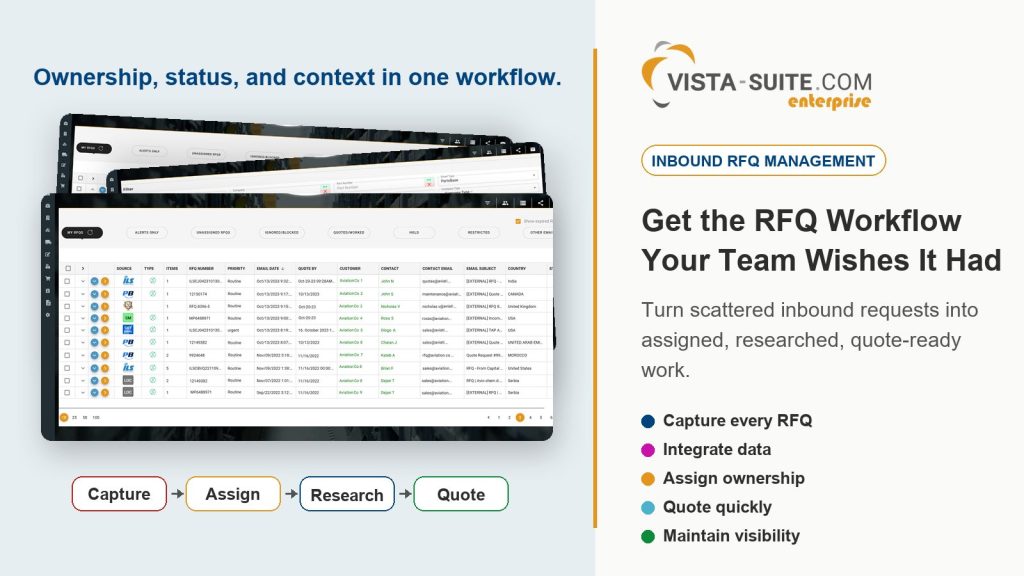
A simple RFQ list can tell you what hit the inbox, but a real RFQ workflow shows ownership, status, context, and the path to action.
How Vista-Suite Enterprise Approaches Inbound RFQ Management
Vista-Suite Enterprise is built for aviation-focused operations that need more than a generic quote screen.
Its inbound RFQ management is designed around the way aviation requests actually arrive, get assigned, get researched, and move toward a quote or no-quote decision.
RFQs can be collected from email messages, listing services, marketplaces, website contact form submissions, spreadsheet files, and other sources. Once staged in Vista-Suite Enterprise, RFQs are presented in a standardized layout so your team can sort, filter, search, and act from a more consistent workspace.
That matters because RFQ formats are inconsistent and difficult to prioritize. One request may include multiple line items. Another may include alternate part references. Another may need faster review because of priority, customer type, country, availability, or internal sales ownership.
Vista-Suite Enterprise supports routing rules that assign RFQs to relevant people or teams based on RFQ details and system records. Criteria can include items such as email address, domain, sender company, country, company type, listing source, sale or repair request type, part number, NSN, aircraft model, ATA chapter, availability of requested inventory, capability type, default group, and tier.
With this kind of inbound RFQ management, your team can avoid confusion by clearly seeing who is responsible for each opportunity and acting quickly.
Why the Details Matter in the Real World
If a part number can link directly to historical records, your team saves effort and time. If inventory availability appears inside the RFQ view, your team can act faster. If the original email stays accessible while forming the quote, your team does not have to leave the workflow to confirm context.
If multiple RFQs from the same sender can be bundled into a single quote response, repetitive work is reduced. If multiple RFQs can be no-quoted at once, you can keep valuable data without asking people to spend unnecessary time on low-fit requests.
Your salespeople want to spend the day winning business, fostering relationships, and responding with confidence. Your operations leaders do not want another tool that needs constant supervision; they want a process they can trust. Your executives do not want growth constraints that depend on constant follow-up. They want a system that helps the business absorb more opportunities without losing control.
That is what a connected RFQ workflow in Vista-Suite Enterprise is meant to support.

Can Your System Simply Quote, or Can It Scale Quoting?
Most aviation business systems claim to support quoting, but can the system help you scale the work around quoting?
- Can it help your team manage high-volume inbound RFQs?
- Can it reduce manual sorting and repeated data entry?
- Can it route requests to the right people?
- Can it help salespeople work from a focused view instead of a crowded inbox?
- Can it preserve useful data from no-quotes?
- Can it connect RFQ details to customer, part, inventory, and history context?
- Can it support visibility for managers without turning every update into a meeting?
- Can it protect access with appropriate permissions?
If the answer is no, your team will still get quotes out, but scaling will simply add more handoffs for people to manage.
Those handoffs compound because more RFQ volume amplifies the weaknesses. More RFQ sources make consistency more important. More salespeople make assignment logic a necessity. More growth makes executive visibility paramount.
What to Ask Before You Choose an RFQ Management System
Before you choose a system, look past the phrase “RFQ management” and ask how the work actually happens:
- Does the system standardize RFQs from different sources into a consistent layout?
- Can it manage requests from email, marketplaces, website forms, and spreadsheet files?
- Can it automatically route RFQs by business rules that match your sales structure?
- Can each salesperson work from a focused RFQ view?
- Can managers see unassigned, worked, ignored, blocked, quoted, and no-quoted activity?
- Can the system keep the original RFQ message connected to the workflow?
- Can your team quote or no-quote multiple RFQs in a batch?
- Can RFQs link to relevant customer, part, inventory, and historical records?
- Can the system support role-based access control across the RFQ and quoting process?
- Can it fit your broader aviation ERP/MRO workflow instead of becoming another disconnected layer?
The answer to those questions will tell you more than a feature list.
Why Waiting Has a Cost
It is easy to accept RFQ friction because your team has learned how to work around it. But workarounds are not free.
Every manual filer, duplicate search, delayed assignment, missed detail, repeated quote action, and invisible no-quote insights takes a small bite out of your sales capacity.
Your team may still get the work done, but the question is how much focus that process takes away from the work that actually wins business.
When a sales team gets stronger collaboration, sharper focus, faster action, and better control over incoming opportunities, quotes move more smoothly.
You should not have to settle for an RFQ process that makes scalable growth harder than it needs to be.
Get the RFQ Workflow Your Team Wishes It Had
Vista-Suite Enterprise helps aviation aftermarket teams bring inbound RFQs into a structured workflow that supports routing, visibility, research, batch actions, access control, and quoting.
If your current RFQ process still depends on manual inbox discipline, manual sorting, disconnected tools, or an individual’s memory, it may be time to look at what our purpose-built aviation ERP/MRO system can do differently.
The right RFQ process should help your team focus on the opportunities that matter, move through requests with better context, and give leaders the visibility they need to guide the business.
Schedule a live demo of Vista-Suite Enterprise and see how inbound RFQ management can become a stronger part of your aviation sales operation: ambryhill.com/demo