


An aviation RFQ is not ready to quote just because it reached a sales inbox. Someone still has to find the key details, decide who owns the request, check the part against business records, and choose whether to quote or no-quote. When that kind of work happens across separate inboxes, searches, and system screens, substantial time and effort are invested before anyone gets a chance to work on a price.
This matters because many companies treat high RFQ volume as an email problem. They aim for faster alerts to help their team see new requests sooner, but seeing an RFQ does not solve the core issue.

The RFQ Email Arrived, But Why Isn’t It Ready to Quote?
Listing-service (marketplace) emails, direct requests, and website forms use different layouts. Part numbers, quantities, conditions, company details, and reply instructions appear in a different location in each message. People can read every format, find the useful details, and enter them on another screen, but each request requires time to visually reorient before the actual quoting process starts. As volume grows, these small manual steps and visual reorientations accumulate, further stalling an already long queue.
How quickly can your team prioritize incoming requests alongside the other RFQs awaiting action? If the key details remain buried in the original email, they must reopen and reread messages before searching by part, grouping related requests, setting priorities, or responding.
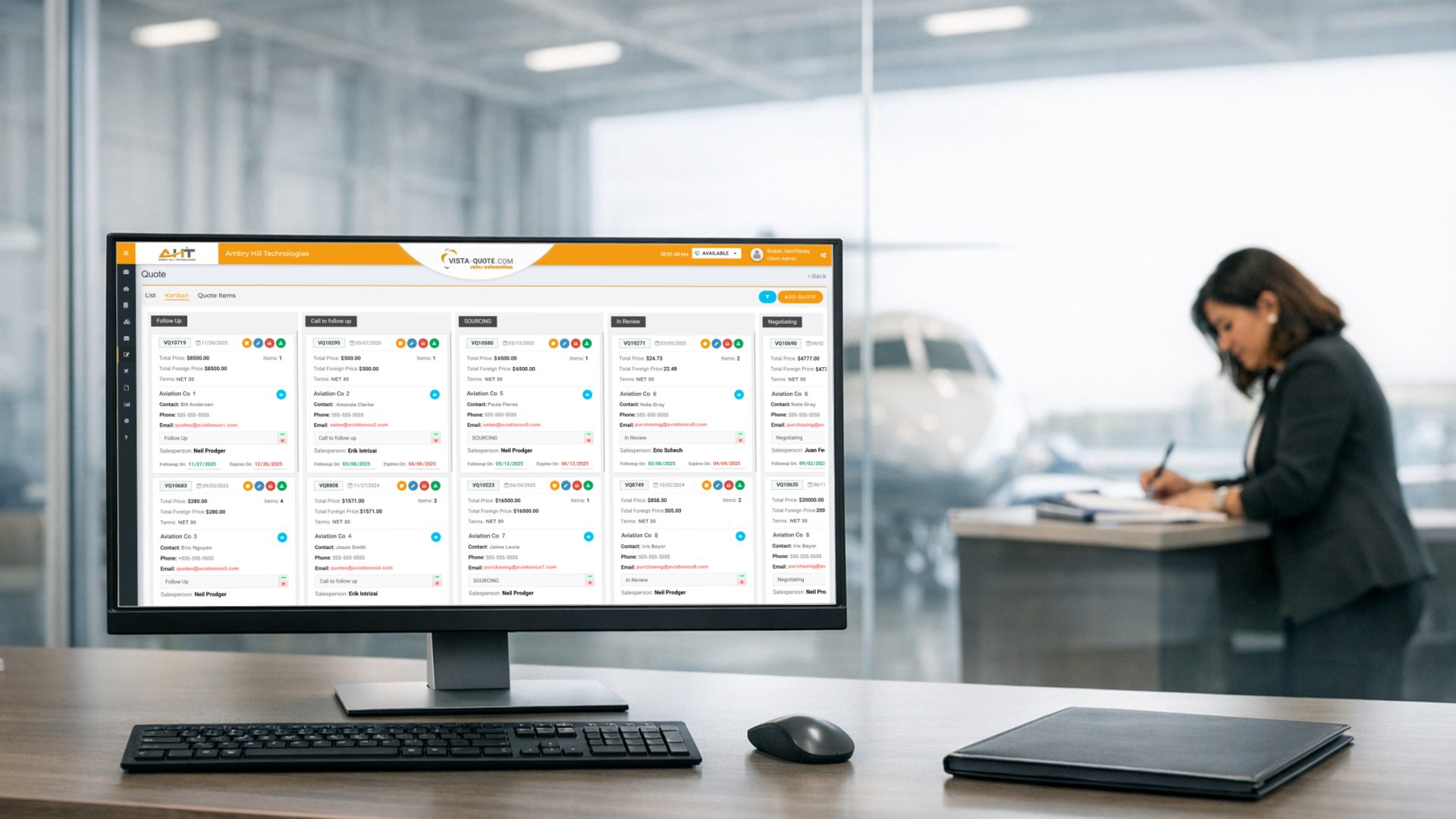
Your team can move faster when each request uses the same basic format and is assigned to a named deal owner. In an ideal world (i.e. Vista-Quote) that owner should also see the inventory and customer information needed to make a sound decision in real time, in one view.
Gain Workflow Efficiency Through RFQ Format Standardization
A common format means the same key fields appear in the same place for every RFQ. The original message should still be available for reference, but your team should not be limited to email layouts as the working interface. Put the system to work. For example, Vista-Quote can parse and organize the request in advance, so the person handling it can more quickly decide whether the business should quote and what it can offer.
Since Vista-Quote restructures inbound RFQs into a standard format, your team can compare similar requests, search by part or company, and group requests from the same buyer without first copying details by hand. This removes manual steps between receiving the email and deciding what to do. It also makes important details easier to spot before someone starts checking availability or preparing a quote.
Beyond Email Forwarding: Centralized Workspace and Assignments
Even a desirable RFQ will stall when no one knows who owns it. Forwarding the email moves the message, but it doesn’t show team dynamics or whether someone else is already working on it. It can also be unclear who should take over when the usual salesperson is away. These gaps create two common problems: more than one person works the same request, or everyone sees it and assumes someone else will respond.
To improve the intake process, why not use details that already appear in the RFQ? Vista-Quote acts as a central command center where company, email domain, country, part number, and other fields can help route requests to the right person according to your desired sales rules. This approach provides sales teams with a clear list of their assigned tasks while giving supervisors visibility into reassignments when necessary. When the deal owner is integrated with a centralized RFQ workflow, it eliminates the need to remember details from email chains.
Pair Inbound RFQs with Your Business Data in Real Time
RFQ dispatch makes clear who should act, but that person still has to decide whether to create a quote. The RFQ explains what the customer wants. Your business records show what inventory you have, what you quoted before, and what you know about the account. That’s why Vista-Quote’s efficient quoting process brings both sides together so the salesperson does not have to rebuild the full picture for every request.
Your legacy system might contain all the necessary information, but it doesn’t save time if the salesperson has to sift through multiple views or screens to find it. Inventory availability, quote history, sales history, credit limits, payment terms, and contact details may all affect the chosen response strategy. When an RFQ sits idle in the email inbox while relevant historical information is buried in several manual searches, each request being worked becomes a mini research expedition.
This is also why a no-quote should be recorded but often isn’t. Marking several requests as no-quote is different from deleting the emails or leaving them unanswered in a sales inbox. A recorded no-quote closes the work and keeps a history of the demand your business chose not to pursue (i.e., inform future pursuits). That history can help you understand repeat requests later, even when no sales came from them.
Mobile Access Should Provide More Than an Alert
Access to reliable quoting should remain available even when away from one’s desk, traveling, etc. A simple phone notification helps RFQs be seen in the inbox, but the alert has little value if the related inventory and customer details are still only available on a desktop.
That’s why Vista-Quote’s mobile access provides the information needed to act, not just alert that new work arrived. The person reviewing the RFQ remotely needs up-to-date business data and customer details. The rest of the operation also needs to see what that person actioned. Because the Vista-Quote mobile process stays connected to the main record, no one needs to re-enter the same work when they return to a desk.
Bridge the Efficiency Gap with Vista-Quote RFQ Rapid Response
Vista-Quote works with existing ERP systems and databases, linking inbound RFQ details to your system data so the person quoting can review related information alongside the request in a central workspace. Intake from multiple RFQ sources and batch quote or no-quote actions are supported, allowing your team to handle related requests together rather than responding to each email separately.
Vista-Quote includes mobile apps that extend your account to mobile devices. Together, these tools help your team convert an incoming email into an assigned request, review the information needed for a quote, and track what happened. Email still carries the request, but it no longer has to carry the entire quoting process.
Request a Vista-Quote demo to see how your RFQ intake, routing, and quote process could work with your current business system at ambryhill.com/demo.
More about Vista-Quote RFQ Rapid Response and Quote Management
What Slows an Aviation RFQ-to-Quote Workflow?
Large delays often occur before pricing. Your team must read different email formats, decide who owns each request, search for internal data, and record the response. Removing extra steps from that work can make each RFQ ready to quote sooner.
Should Every RFQ Receive a Quote?
No. A no-quote is a valid response when the request does not fit your inventory, terms, or business priorities. The important step is to record and close the request instead of letting it disappear in email.
Can RFQ Automation Work With an Existing ERP?
Yes, if the RFQ system is designed to work with your ERP or database. The key test is whether it can connect the incoming request with the internal information your team needs to quote or no-quote.
Vista-Quote Connects Each Request to the Work Needed for a Reply
Vista-Quote recognizes RFQs in email and puts the key details into a common format. The original email remains available for reference. Vista-Quote can also route requests by details such as company, email domain, country, and part number, which gives each RFQ a clear path to an owner.