


A mechanic shouldn’t have to create a “general labor” task just to log an hour on an open work order, as a workaround for the ERP software’s limitations. Nothing was inspected or repaired under that task; it only exists because the labor entry had nowhere else to go. Similarly, the same thing happens when someone adds a “miscellaneous material” task solely to issue a part, or opens an administrative work order for countless other timed activities.
Those workarounds are dismissed as minor data entry, but they consume shop time and leave management with a distorted account of the work. Modern MRO work order management in Vista-Suite Enterprise lets mechanics follow the checklist, record time and material where they belong, and move on. When that happens, the open job contains useful cost information, so it doesn’t have to be reconstructed from notes and memory.
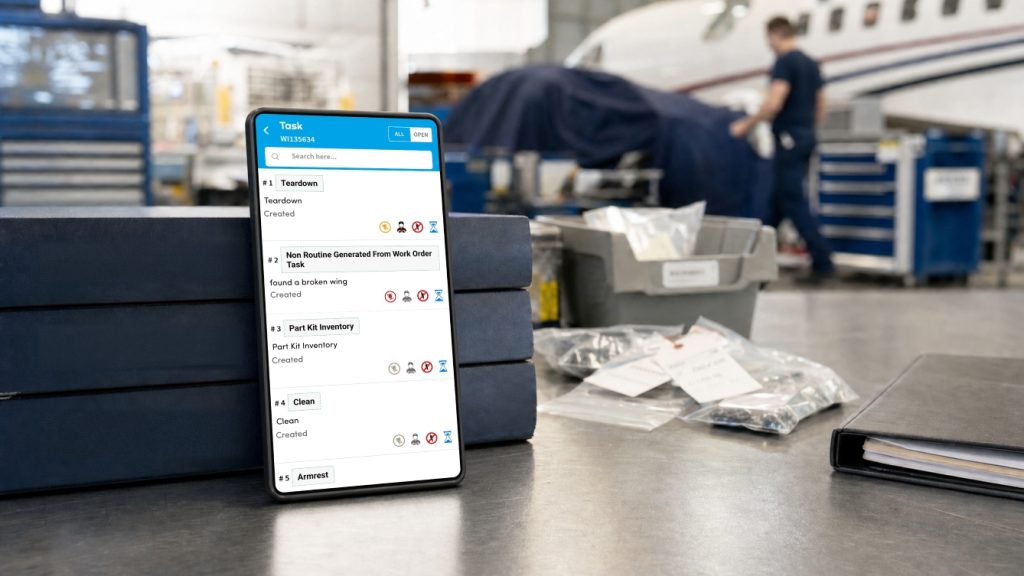
Create Tasks for Real Work (not placeholder data entry)
A real task earns its place on the work order because someone must perform it. It may require an assignment, planned hours, a sign-off, or a separate technical history; and its status provides useful information about the unit. A placeholder task does none of that.
The distinction becomes obvious when the job is reviewed later. If one person uses “general labor” and another uses “shop support,” comparable hours are split across labels that describe localized habits rather than the maintenance performed.
Each artificial task increases clerical workload since someone must create, update, and close it. As the volume of tasks rises, authentic findings and approved repairs become more difficult to distinguish from entries made solely due to software gaps.
Checklists Lead Aviation Maintenance Technicians (AMT) Through the Job Efficiently
Once tasks are reserved for actual work, the structure of the job becomes much easier to understand. The work order identifies the unit and the overall scope, while the checklist lays out what the technician must complete. A task is created when a checklist step needs its own assignment or technical detail, not every time the shop needs to apply another cost.
A technician should be able to open the work order on a tablet, see the next checklist step, complete it, and record the labor before moving away from the unit. If the time entry waits until the end of the day, the individual has to remember when one job stopped and another began.
Vista-Suite Enterprise’s work order system components are robust yet easy to use, reducing the amount of ERP knowledge a technician needs to get the job done. Simply having the correct job assignment and a simple way to report the required work goes a long way. Submitting labor and completion entries through the maintenance process allows personnel to report without needing to think like system administrators.
Not Every Labor Hour Belongs to a Work Order
Incoming inspection, tool calibration, and repacking inventory all consume labor, though none are directly tied to a real maintenance job. When an ERP only accepts time against work orders, the shop typically generates administrative orders with generic titles, which then serve as permanent repositories for unrelated tasks.
That approach hides where the time went. An hour spent inspecting a received part should remain with the inventory entry, whereas time spent preparing an item for shipment may belong with the sales order, for example. Recording the hour against the item responsible for the work removes the requirement to keep orders for uninvolved aircraft, components, or customer jobs.
Why Late Data Entries Are a Major Problem, and How to Fix It
A supervisor cannot accurately manage the cost of an open unit if labor is entered late. The same problem happens when freight costs remain in an email or when material is issued through a placeholder that’s not immediately recognized. The shop may be doing the work correctly, but the work-in-progress total is incomplete when management needs it.
When reviewing invoices, consequences of using placeholder tasks become evident as questions arise, prompting someone to track down the person who entered it. Meanwhile, the customer faces delays as the company determines whether the charge was authorized and where it should be allocated. If there is no explanation, the charge might be delayed, disputed, or even written off.
Accurate data capture during the work prevents the runaround by keeping the quote, work order, and invoice separate while maintaining the link between an authorized charge and the work performed. Also, historical data becomes more useful when planners can see which technical steps consumed time and which costs applied to the job as a whole.
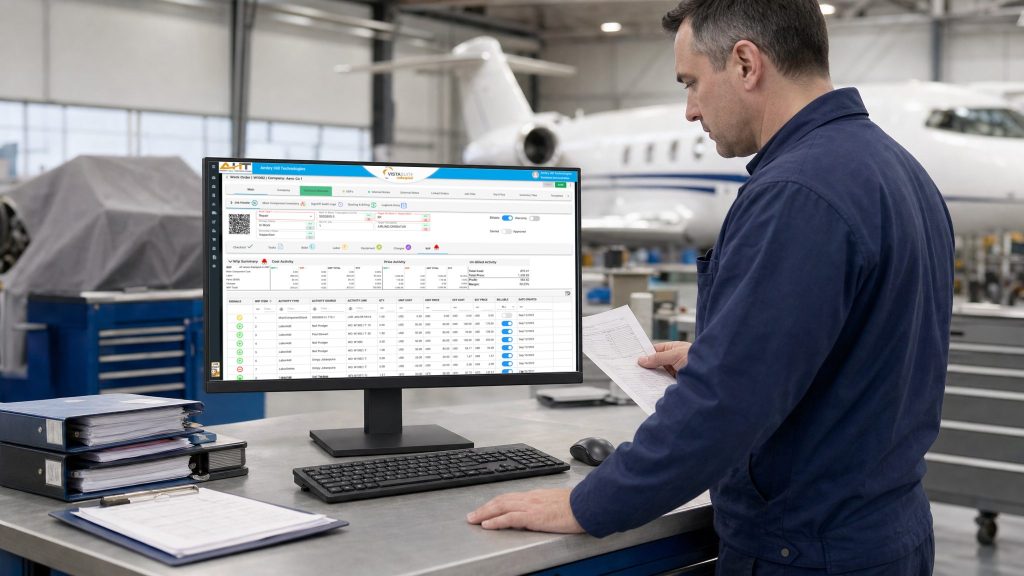
How Vista-Suite Enterprise Handles Modern Aviation MRO Activity
Vista-Suite Enterprise lets your team record labor, add parts and materials to the Bill of Materials (BOM), and enter charges such as freight directly on the main work order without creating separate tasks. These costs appear in the work-in-progress (WIP) log alongside costs entered on individual repair tasks.
Technicians can open job checklists in the Vista-Suite Enterprise mobile app, follow the required steps, and quickly record their time. If repair steps need separate assignments or documentation, the shop can create a task for it. Otherwise, the technician can record labor directly on the job.
Vista-Suite Enterprise records labor across the operation, not just on work orders. For example, time can be tied to sales orders, inventory records, stand-alone activities, and more. This keeps customer work separate from internal shop activity, shows managers where hours are actually being spent, and removes the need for administrative work orders created solely to capture time.
Quoting and invoicing remain connected to the work-order process, so costs can be reviewed with the job information still attached.
To see how that structure would handle your own checklist, labor, and billing requirements, request a Vista-Suite Enterprise demo at ambryhill.com/demo.
More About Modern Aviation MRO
Why do MRO shops create dummy work-order tasks?
Many systems require a task before they will accept labor or material. Shops create a broadly labeled task to move the entry through the system, even though the task does not represent a distinct maintenance step.
When should labor be recorded at the job level?
Job-level labor is appropriate when the time applies to the work order as a whole rather than one technical task. Task-level labor remains useful when the shop needs separate planning, assignment, status, or technical history.
How do administrative work orders affect labor reporting?
Administrative work orders group unrelated activities under artificial job numbers. That can obscure whether the time was spent on incoming inspection, tool calibration, inventory handling, or another operational activity.
How does mobile labor entry help an MRO shop?
Mobile entry lets a mechanic record time near the unit instead of reconstructing the day later at a desktop. Supervisors receive earlier visibility into labor accumulating on open work.