

Use the browser-based Forms and Reports Designer to arrange connected fields, expressions, groups, and output settings for Vista-Quote documents and reports. Built-in dashboards provide ready-to-use operational views, while approved ODBC access can support external reporting tools such as Power BI and Crystal Reports.
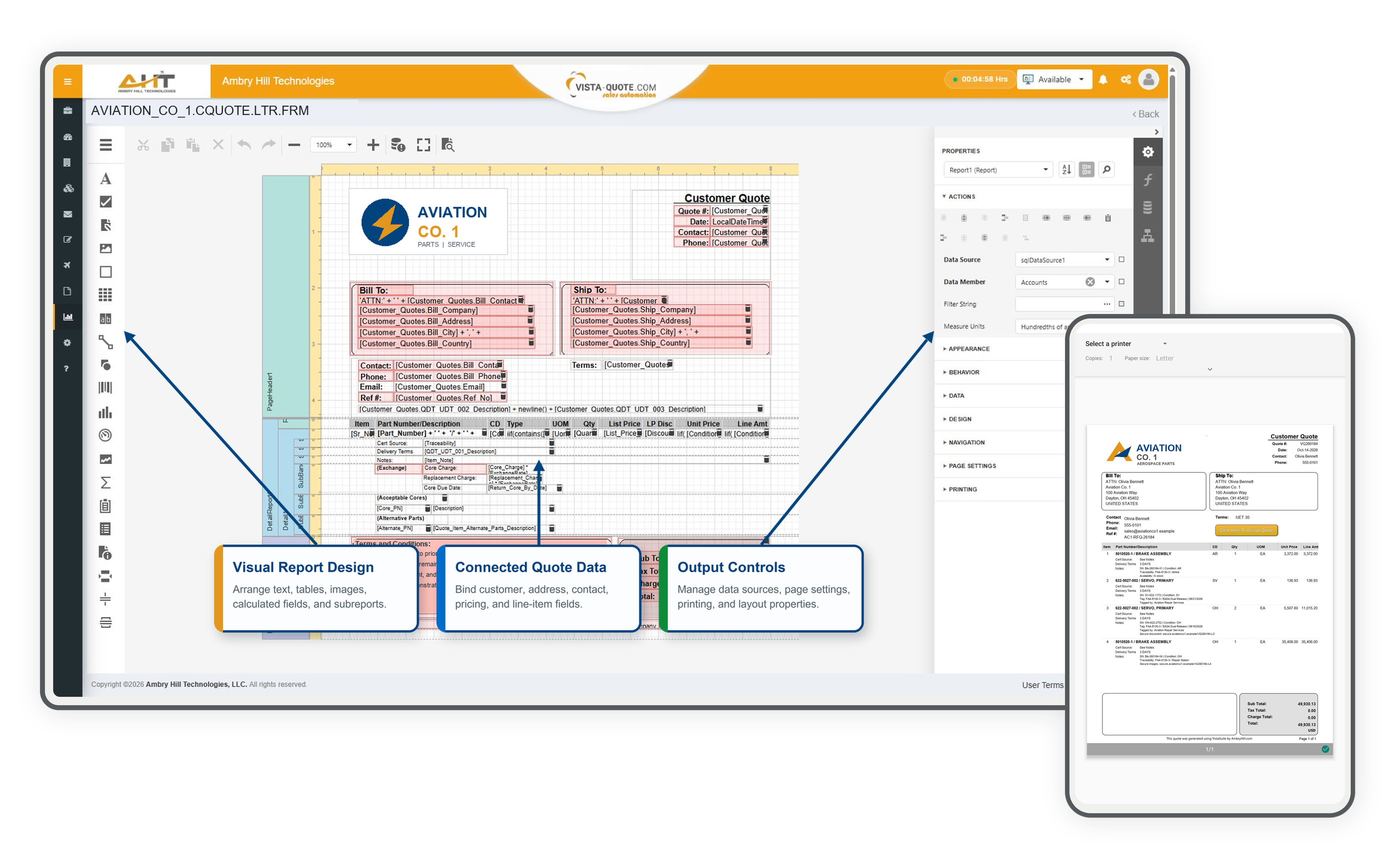

A detailed customer-quote template shows how company, billing and shipping, contact, terms, line-item, totals, and footer elements are arranged directly in the browser. The callouts distinguish the component toolbox, connected quote fields, and report-level page and output settings.

Build calculated document fields from connected quote data and control the displayed result with business conditions. In this customer-quote example, an NQ condition returns “No Quote”; otherwise the form displays the calculated line amount.
Vista-Quote includes ready-to-use dashboards for monitoring workload, turnaround, customer engagement, and quoting activity, giving teams immediate visibility into everyday performance.

Review current user, harvesting, RFQ, and quote totals alongside daily intake and outcome trends. The same connected view also surfaces the most requested, quoted, and no-quoted parts for the selected period.

Compare current RFQ assignments across the team, then switch between Last 10, Last 50, and Total Average views to evaluate turnaround time by request outcome.

Compare active, quoted, ignored, blocked, and no-quote customer activity across selectable time periods to identify account patterns and focus sales attention.

Produce a complete customer quote with coherent line-item detail, secure supporting-document links, a staged attachment, verified totals, and online-acceptance content before any email or connected-system action.

Print an operational inventory label using the established product template, with serialized identity, condition, tag and receipt details, warehouse context, location-change tracking, and inspection accountability.

Review date-bounded RFQ workload by user across source, customer, requested part, quantity, condition, and status in one operational report.

Review aircraft, helicopter, and engine assets by owner and group with model, serial and registration identity, current location, utilization, and induction-date context.

Find the right part information faster with a searchable listing that brings ERP keys, part numbers, and descriptions together in one reliable reference.

Turn connected account data into a practical, exportable directory that combines ownership, address, location, website, and cross-system mapping status.

Review date-bounded screening activity with company and country results, clear, hold, and restricted outcomes, alert and transaction indicators, and recorded review notes.
Software development moves fast, and features evolve over time. While we strive to keep this and other pages accurate, some information may not reflect the most recent changes. For the most current details, we recommend scheduling a live demo at ambryhill.com/demo.
Create, connect, and share the information your aviation business needs.