

Vista-Quote brings incoming requests into a unified RFQ workspace where your team can review the original message, standardize requested-part details, research availability and history, apply routing and alerts, and move qualified requests into quoting.
Centralized intake, structured requested-part details, routing, batch actions, inventory visibility, and research links help the team spend less time re-entering data and more time evaluating the RFQs that are ready for action.
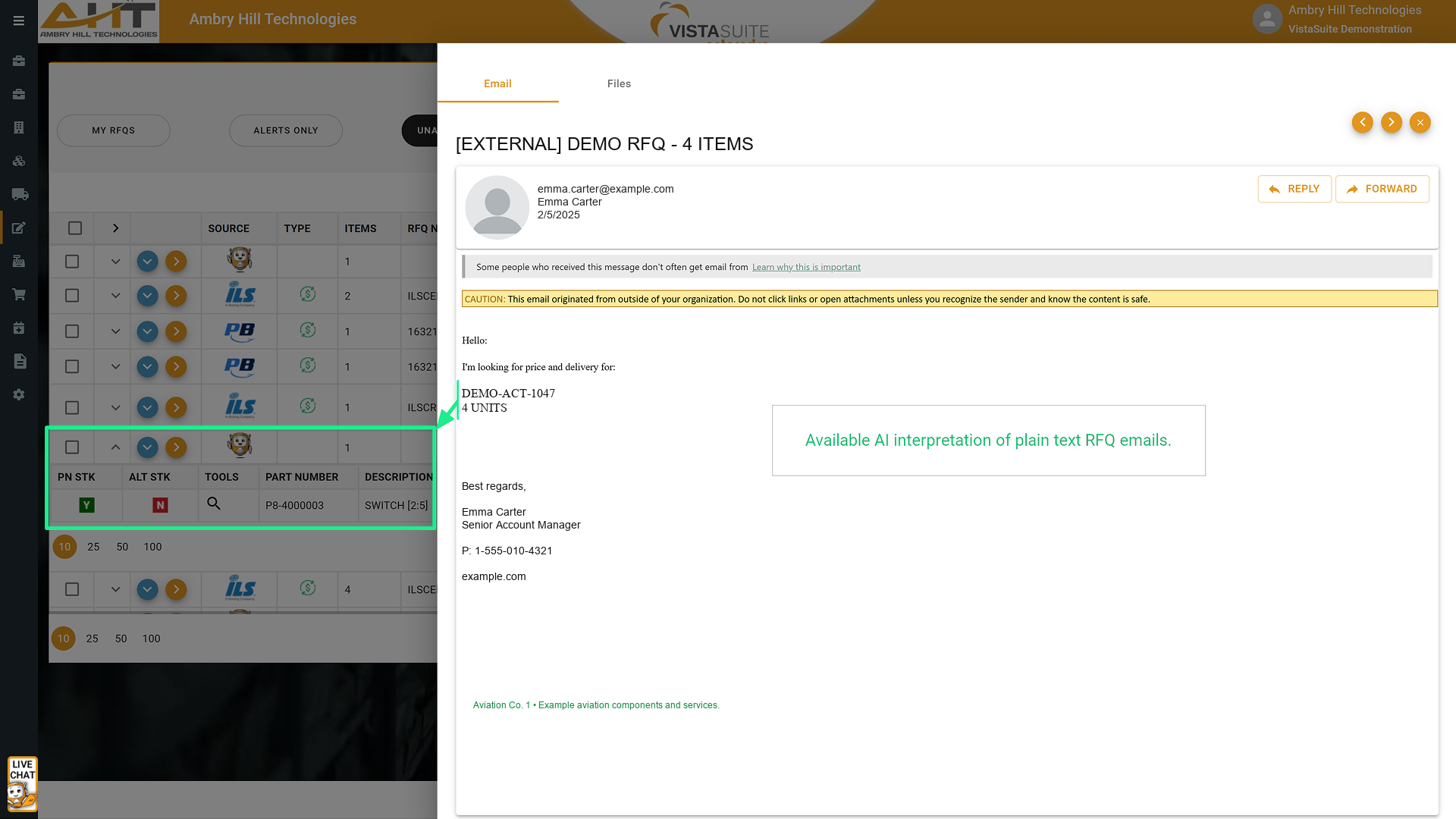
Review the anonymized source email beside the quote-ready line Vista-Quote interpreted from its plain-text request.

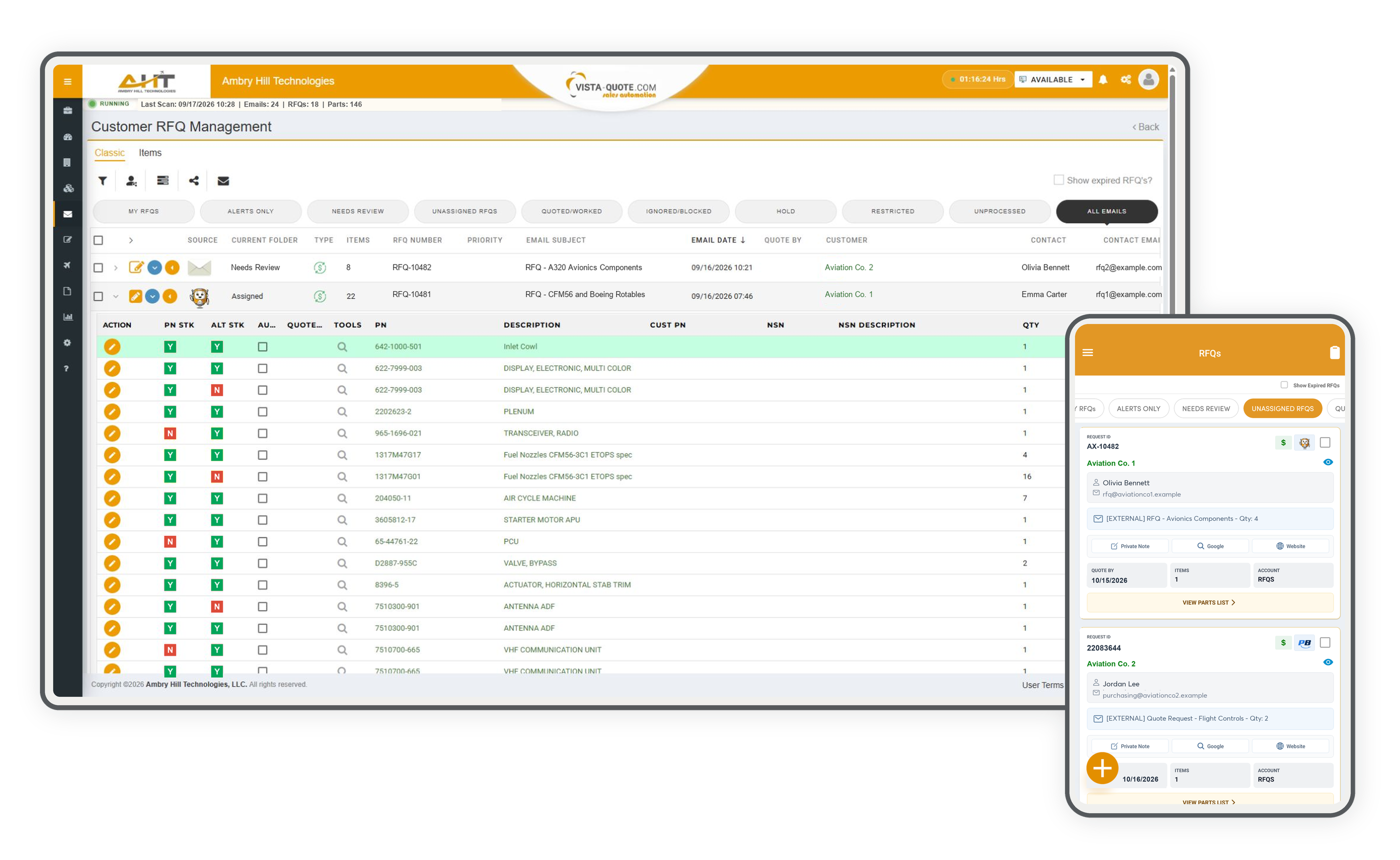
Review standardized request details, source, customer, inventory indicators, and all quote lines without leaving the queue.

Combine date, source, part, buyer, inventory, transaction, priority, domain, and subject criteria while keeping the populated RFQ queue in context.

Edit complete requested-part details inline and launch connected aviation research sources from a populated multi-line RFQ.

Focus each salesperson on owned work while three user-configurable alert tiers visually surface personal priorities across multiple RFQ sources.

Govern active routing and alert logic for regions, urgency, customer tiers, inventory availability, transactions, and product teams.

Capture a complete phone or receptionist request with buyer details, deadline, part requirements, line comments, and an internal note.

Keep reports, service notices, newsletters, work instructions, and other non-RFQ traffic visible in a dedicated review queue.

Manage shared and personal inboxes, targeted folders, marketplace connections, CRM sources, active states, and Auto Quote ownership in one view.

Control how recognized, unrecognized, and Auto Quote messages move through inbox and archive folders after harvesting.

Review a large imported request with complete part details, refreshed inventory checks, quote deadlines, and the standard RFQ workflow.

Inspect authentic ERP inventory and customer quote history without losing context during a large Push-List or Imported RFQ job.

Keep RFQ follow-up accountable with a date-bounded operational report that brings each request's source, customer, part, quantity, condition, owner, and outcome into one view.

Spot assignment imbalances and response-time patterns quickly by comparing team workload with recent and total-average turnaround results.
Keep inbound requests moving when you are away from your desk, with the customer, source, message, requested parts, research tools, and workflow actions available from the same mobile queue.

Review new requests with the source, buyer, message, requested-part count, and research tools together so the next action is clear even when you are away from your desk.

Give the sales team shared internal context for an RFQ—including priorities, buyer preferences, and follow-up details—while preserving notes about auto-quote actions, decisions, and reasoning.

Review the buyer’s requested part, customer part number, condition, note, and master or alternate matching status before opening the mapped Vista-Quote part record.

Open the RFQ part number to review prior Vista-Quote quote activity by date and customer, then move between quote, RFQ, and inventory history before deciding how to respond.

Open the Vista-Quote part record mapped to an RFQ line to review its identity, condition, availability, quantity, and lead-time context without returning to a desktop.

Route a selected request into quoting or the right operational status, and assign or reassign ownership, from the same mobile queue.
Software development moves fast, and features evolve over time. While we strive to keep this and other pages accurate, some information may not reflect the most recent changes. For the most current details, we recommend scheduling a live demo at ambryhill.com/demo.
Bring every inbound RFQ into one organized workflow and respond to more opportunities faster.