

Vista-Quote can surface company warnings, screening context, part classifications, role permissions, user defaults, and RFQ routing statuses inside the quoting workflow. Requests remain available in focused working views, while authorized users can review and reclassify them as circumstances change.
Instead of relying on audits after the fact, mitigate errors in real time with features such as pre-quote warnings, part number validation mapping, and RFQ export compliance screening.
Structured data entry in Vista-Quote minimizes errors, and a comprehensive set of safeguards helps your aviation businesses uphold accountability, safeguard reputation, and meet regulatory standards as an integral part of daily operations.
Use configured rules to classify incoming RFQs into focused working views such as Ignored/Blocked, Hold, or Restricted while keeping the requests available for review and reclassification. Row-level status indicators reinforce the current routing state, and quote-time alerts can guide users when a company requires additional attention.
Vista-Quote comes complete with an export compliance toolkit to eliminate manual and fragmented processes. Compliance-critical documents like end-use Certificates and export licenses can be stored within the company or part records for immediate access. Automated denied party screening runs in real time through a premium Descartes Visual Compliance integration, with audit trails and compliance holds applied to flagged inbound request for quotes (RFQs). Users can assign and track part-level classifications, including ECCN, HTS, ITAR, and more. Structured note systems and note-based reporting ensure continuity and accountability across your compliance workflows.
Activate compliance triage at intake so flagged RFQs are separated from standard RFQs while other requests remain visible in their normal working views. With the optional Descartes eCustoms Screening integration, inbound RFQ results can be classified into the appropriate Vista-Quote status view.
Operate a controlled manual screening workflow by applying permission-based settings so only users with the necessary clearance can change a customer’s compliance status. An integrated screening interface is available for scenarios that require manual checks.
Customers can be classified with compliance statuses to govern visibility and quoting access, such as Clear, Hold, or Restricted, based on screening results. The Restricted status prevents the company from being viewed and quoted by all users, while Hold is visible to select users who have the necessary permissions. Clear requires no further action, and cleared RFQs are visible to all.
View a customer’s export compliance screening result to have an immediate readout for the company under review. You can also instantly re-screen the company in the Screening Results view to refresh results as conditions change, keeping compliance data up to date at the point of action.
Companies can be designated as “restricted” to trigger automated routing of their inbound RFQs to a list meant solely for viewing RFQs with the restricted status. The status can be cleared easily if you want to update the customer’s compliance standing later.
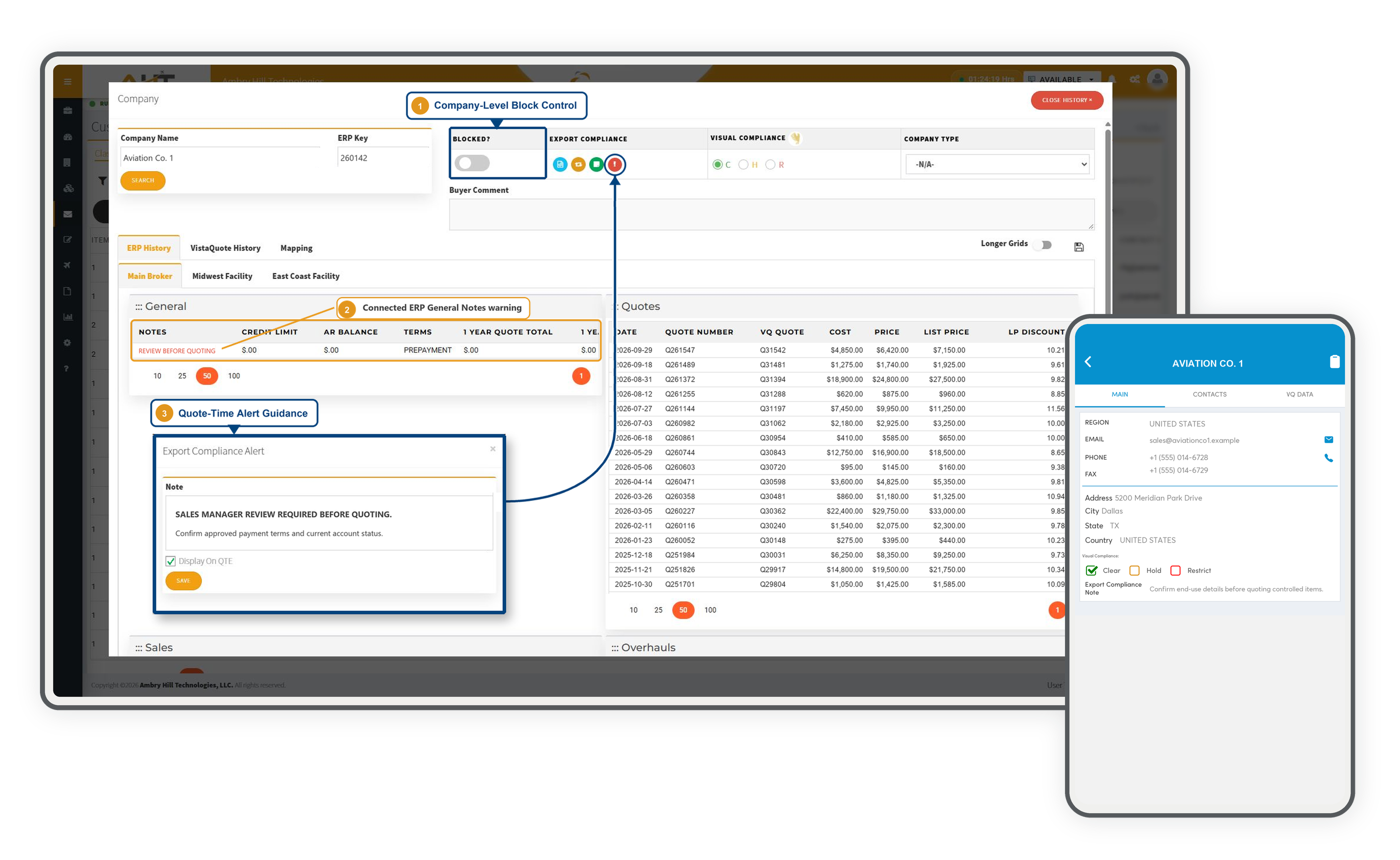
Capture internal compliance details by recording company notes tied to status changes among Clear, Hold, and Restricted, and configure pop-up alerts that display to all users whenever an RFQ from the company in question enters quoting mode, using your own text to guide how the RFQ should be handled. Notes and quoting alert capabilities are documented separately from Vista-Quote’s integration with Descartes eCustoms Screening. Meaning, even without Descartes eCustoms integration, you still have tools to support quality control.
If Vista-Quote is connected to an ERP system, there is a high probability that existing ERP company/customer account warnings can be displayed as company warnings within Vista-Quote (i.e., export compliance warnings across modules). This is perfect if you are managing the latter half of the sales cycle in your connected ERP—tracking compliance, accounting, and other warnings—that are valuable during the RFQ-to-Quote process.
Fields in the part master record—including ECCN, ITAR, Schedule B, and HTS—keep export and import classification context accessible at the part level. Vista-Quote can also display this information from a connected ERP when the source system and connection support it; this feature specifically describes Vista-Quote’s native part and inventory records.
When using Vista-Quote inventory, a special field called “Date Last Reviewed” exists to indicate that your person responsible for Import/Export Compliance has reviewed the classification, and the date value you assign shows when it was reviewed.
When using Vista-Quote inventory, a dedicated compliance note area prevents mixing with general notes. This is a massive advantage for efficient team communication and compliance awareness.
ERP systems can typically send automated email alerts when new part numbers are added. Because of that capability, when a new part is added to your connected ERP from Vista-Quote, your notifications will trigger normally, supporting proactive compliance workflows. As a premium service, our team can configure email notifications upon request.
The inventory labels provided in Vista-Quote include the ECCN identification and Country of Origin. Generate a barcode label for inventory item identification with essential details and space to track up to two location/bin changes. A larger 4x3-inch label contains more details and space to track up to six location/bin changes.
Display company and part compliance context within relevant workflows so users can review classifications, screening status, and internal controls closer to the point of action.
Maintain license details in Vista-Quote using adaptable, user-defined fields that can be reported on, supporting compliance workflows without requiring those details to live in a separate license-management area.
See what company records need to be screened and what current statuses are, as well as a review of any Export Compliance Notes attached to the company. Sort all companies according to the restricted party screening categories of Clear, Hold, or Restricted. A separate Descartes membership is not required, but is recommended to automate the screening process.
Vista-Quote gives your team control over their workflow without slowing them down. From flexible role-based permissions to user-level profile and email configurations, every setting is designed to keep quoting fast, consistent, and secure. Administrators can tightly manage access to sensitive actions like ERP mapping, compliance updates, data deletion, and more. With built-in controls for email authentication, quote output, and system access, Vista-Quote helps every user operate within clear guardrails that protect data integrity, enforce compliance, and provide a seamless quoting experience at scale.
Set the foundation for what a user can do with powerful role selection. ClientAdmin unlocks full system control, including adding, editing, and removing users, while ClientUser provides a focused workspace scoped to daily quoting tasks. Admins can fine-tune certain aspects as needed to match the org chart without compromise.
Access to account areas and configuration menus is governed by admin privileges and controls who can view and modify settings across the system. Sales users get the controls they need to work efficiently; sensitive configuration stays protected.
Give the right people the ability to map companies and parts directly into your connected ERP. Keeping this permission intentional prevents data integrity issues and ensures ERP records stay controlled and trustworthy.
Let authorized users update system-wide company defaults from wherever they're already working, such as a quote, the company history window, or the company record itself. No detours, no wasted clicks through layers of menus.
Control who can update a company's compliance standing (Clear / Hold / Restrict). Limiting this to trained users enforces export program governance while keeping the rest of the team moving without disruption.
Hold and Restricted RFQ tabs are only visible to users with special privileges. Everyone else works from a filtered view that reflects only what they're permitted to act on. This reduces compliance risk without slowing down the quoting team.
A dedicated show-all filter surfaces every incoming RFQ of all time within sorted viewing areas. This is helpful because Vista-Quote hides old RFQs, based on a time frame of your choice, to reduce workspace clutter. So, by showing all RFQs, you remove this duration filter for a look back in time.
Protect shared inbox integrity and ensure nothing gets lost before it's been properly routed by preventing users from removing emails from the Other RFQ area.
Keep RFQ routing rule creation in the hands of admins. This ensures email distribution logic stays deliberate and consistent rather than drifting through ad hoc changes.
Block users from pushing new parts or companies into the connected ERP. Targeted control like this helps prevent unauthorized records from entering your source-of-truth system without touching any other quoting functions.
The contact details stored in user profiles are the ones customers see. Name, email, and phone can be used to populate outbound quote communications, so every touchpoint reflects a real, consistent point of contact. Replies route back to the rep’s email, keeping ownership clear without any extra steps to maintain continuity.
Because Vista-Quote is an approved service in Office 365, connecting your account is straightforward. OAuth is the recommended path, and users authorize Vista-Quote through Microsoft's standard OAuth flow without needing app passwords or manual SMTP credentials. Once configured, outbound emails send on behalf of the user's account with authentication that meets modern security standards and IT policy requirements.
Store a formatted email signature for use in every customer quote message. The signature area supports links and images for design flexibility.
Set your most-used quote template as your personal default so every new quote starts in the right format immediately. When a specific customer or situation calls for something different, the full list of available templates is always one click away. Override freely on any quote, and your default stays in place for next time.
Using the built-in quote template, users can customize customer-facing quote emails exactly as they need. The provided code-set placeholders control which data fields appear in a straightforward interface. Templates are personalized for each user to support different team structures and use cases.
Define what user information auto-populates into the quote header when a new Customer Quote is created, such as contact details, CC or BCC recipients, salesperson, default quote type, and CRM actions. Preconfigured default settings like this mean that reps don’t have to manually configure every quote, leading to quicker responses and fewer formatting inconsistencies reaching the customer.
Configured rules can classify matching requests into the Ignored/Blocked working view, where the native green B status indicator keeps the outcome visible across team activity. The RFQs remain available for authorized review and reclassification rather than being deleted or irreversibly hidden.
Bring company-level block controls, connected account warnings, and configurable quote-time guidance into one review context so sellers can recognize concerns before proceeding with a quote.
Enable company export-compliance tools, connected Visual Compliance screening, automatic part-number mapping, and guided ERP refresh prompts from one account-level configuration.
Review returned company and country screening details alongside the account's current Clear, Hold, or Restricted compliance classification.
Keep ECCN/ITAR, Schedule B, HTS, source, review timing, customs-value handling, and compliance notes together at the part level.
Fine-tune a user's access to mapping, company defaults, compliance status, RFQ history, routing rules, email deletion, and ERP record inserts.
Build a formatted signature with imagery, table-based structure, and hyperlinks while configuring the connected email method, reply-to address, inventory labels, and reusable quote-email defaults.
Set company and recipient defaults, CRM ownership, customer-email and connected-ERP actions, visibility preferences, and the user's default quote form.
Review the current export-compliance status assigned to company records in a populated directory while retaining the report's status-selection parameters.
Review screening activity for a selected date range, including each company's screening status, company and country results, alert and transaction indicators, and any recorded export-compliance notes.
Print the established inventory label template with coherent serialized identity, overhaul condition, tag and receipt details, control-batch context, location-change tracking, and inspection accountability.
Keep important account context, RFQ controls, and internal decision details visible while work continues away from the desktop.
Review the company’s native Clear, Hold, or Restrict state and its account-specific compliance note before customer work continues.
Move an RFQ into the appropriate operational status and manage assignment from the genuine mobile action menu without hiding the request from view.
Keep sales-team notes and auto-quote decision details attached to the RFQ so the reason behind an action remains available during follow-up.
Software development moves fast, and features evolve over time. While we strive to keep this and other pages accurate, some information may not reflect the most recent changes. For the most current details, we recommend scheduling a live demo at ambryhill.com/demo.
Put proactive safeguards, compliance visibility, and controlled user access into every Vista-Quote workflow.